
How to forward an email to Gmail, Yahoo or other email service providers?
Email Account Forwarders:
Step 1: Log in to your hosting account.
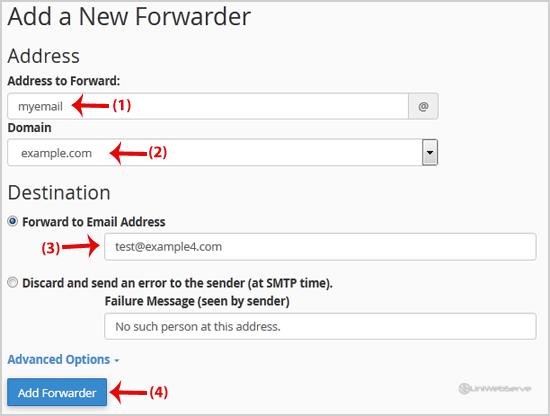
Step 2: In the Email Section of your hosting, click on Forwarders and then click on Add Forwarders.

Step 3: On the Add a New Forwarder page, you will see the Address to Forward: field. If you want to forward your myemail@example.com to your custom e-mail address, enter my-email in the Address to forward, field, and should you have multiple domains, select the appropriate one from the domain drop-down list.
Step 4: From the Destination field, select Forward to email address and enter your custom e-mail address on which you want to receive forwarded emails.
Final Step: Click on the Add Forwarder button.
How to forward an email to a mail pipe script/program?
1. If you want to forward your email to an e-mail pipe script like myemailpipe.php, which is located in your public HTML folder like /home/username/public_html/myemailpipe.php, follow Step 2 and Step 3.
2. In the Destination field click on Advanced Options to expand them, select Pipe to a Program, and enter the full path of your custom email pipe script such as home/username/public_html/myemailpipe.php (Without the quotes, and you may have noticed that we do not use a slash at the beginning of the URL.)
3. Click on the Add Forwarder button.
Let us know — it helps us improve our articles.
Our support team is ready — we'll sort it out for you.
Powered by WHMCompleteSolution