
How to create a new email account?
First. You need to log into your account/client area, click Products, click Active next to your domain name, and scroll down to find Email Accounts.
To create a new email address, perform the following steps:
1. Log into your cPanel account.
2. In the Email section, click the Email Account Icon.

3. Click on the + Create button. You can find this on the right-hand side.
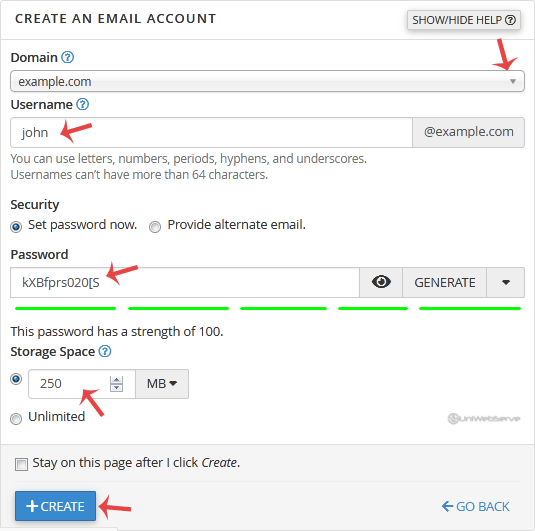
4. Under Create An Email Account, fill up the following details:
Domain: If you have more than one domain, select the appropriate domain from the drop-down list.
Username: Enter a username such as your first name.
Security: Select Set password now and enter a password or use a generator to generate one.
Storage Space: Enter the amount of storage space or select the Unlimited option.
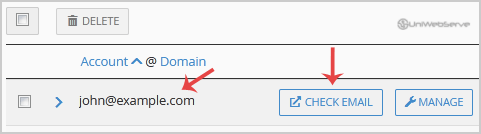
Once your email account is created, it will appear under the Account & Domain tab.
Let us know — it helps us improve our articles.
Our support team is ready — we'll sort it out for you.
Powered by WHMCompleteSolution